RPS Tracker
Earthmoving Intelligence™

Simple hardware. Smarter insights. Immediate impact.

RPS Tracker Banner - Earthmoving Intelligence (TM) - ADTs, Scraper, & Excavator working on a site.

The new standard for material movement and operator performance optimization.

Unlock THE FUTURE OF LOAD-AND-HAUL OPERATIONS WITH RPS TRACKER

RPS Tracker is transforming load-and-haul earthworks for Civil Construction, Mining, & Environmental Remediation projects with Earthmoving Intelligence™.


Unlike traditional telematics systems that only track machines and loads, RPS Tracker provides a comprehensive view of every machine, truck, and operator. Our platform delivers real-time insights into operator performance, cycle times, and material movement... empowering you to make data-driven decisions that eliminate inefficiencies, boost productivity, and maximize profitability across your projects.

With RPS Tracker, your operational data is seamlessly connected to a digital map, giving you a real-time, actionable picture of your entire site. From tracking material placement to monitoring driver performance, RPS Tracker provides the insights and recommendations you need to keep your projects on time and on budget - no matter where you are.

Still Relying on clipboards, clickers, and spreadsheets? It's time to modernize your load-and-Haul operations.

Countless hours are lost to inefficient data collection, manual log sheets, and inaccurate project tracking numbers. Not to mention scrambling to Email & SMS daily shift summaries.

These methods result in wasted time, missed opportunities for optimizing organizational processes, and decreased profitability.

Eliminate old-school tracking tools such as spreadsheets, clickers, and clipboards.

The outcome leaves gaps in your data and fails to provide complete visibility into what’s really driving the numbers – not allowing you to see what’s happening with your machines and operators.

SEE HOW RPS TRACKER PROVIDES YOUR PROJECT DATA IN REAL TIME

Task Clarity = Productivity & Performance Gains

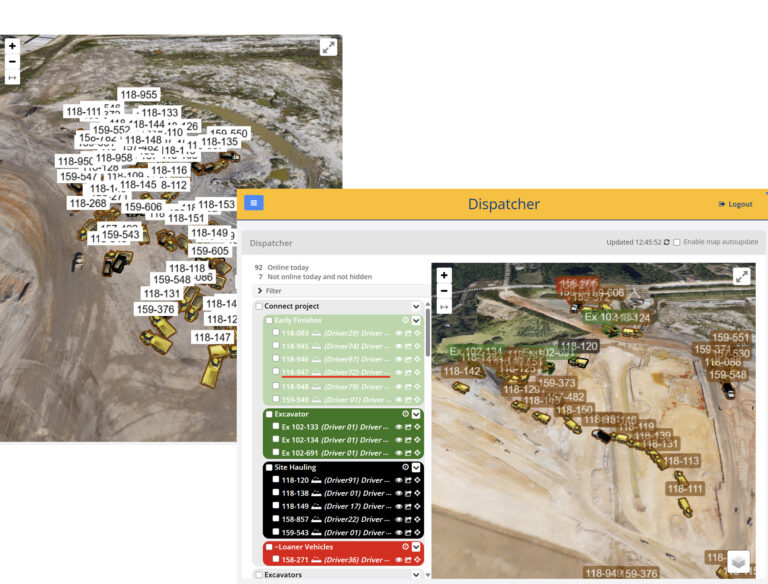
RPS Tracker Dispatcher View vs Traditional Telematics Tracking
RPS Tracker's Task Assignments (bottom right) vs Telematics "Dot-on-the-map" Status (top left)
  • Eliminate guesswork: Instantly see task assignments and performance by machine and operator.
  • See your truck-to-loader assignments and control your loading balance with real-time tracking.
  • Instantly identify when operators are off-task or ‘off script’ from the plan.
  • Report and analyze all captured data grouped by the assigned tasks.

Do you know what machines are NOT producing today?

Everyone tries to track active machines. But what about machines assigned to your project that aren’t active?

  • Instantly identify idle, unproductive, or unassigned machines across your worksite.
  • Know where it was last seen, what it was doing, and how long it’s been inactive.
  • Spot handoff failures between site operations, field teams, dispatch, and maintenance.
  • Identify losses due to driver shortages, scheduling
    gaps, and underutilized rentals.
  • Quickly identify and reassign unused machines to other projects. Improve utilization, reduce rental costs and project overhead, and drive profitability.
What You Don’t Track Could Be Costing You More Than You Think.
RPS Tracker Unused Equipment Dispatcher View

Know What Machines Are Down and Track Downtime

RPS Tracker's Maintenance Tracking Group
  • Track every machine in maintenance mode.
  • Know when downtime began, see where the machine was last active, and how long it’s been since it was last powered on.
  • Eliminate costly handoff communications and gaps between maintenance and operations; make sure machines are put back into production when they’re ready.
  • Stay on top of machines in maintenance.
  • Report on individual and fleet time lost due to maintenance.
Get Machines Back to Work. Stay Productive.

Know Every Machine’s Role. Reassign in Seconds When Tasks Need to Change.

  • Instantly track and report billable sitework and improvements vs. contracted sitework.
  • Protect margins, catch scope creep early, and avoid doing extra work for free (i.e., untracked or unbilled quantities).
  • Monitor and accurately track the number of trucks assigned to an excavator or excavator group.
  • Quickly know which equipment to rebalance when rock or other issues slow down excavator loading.
  • Quickly reassign tasks:
    • Supervisor pushes the task assignment
    • Drivers ‘push one button’ when a new assignment is radioed in.
RPS Tracker View of Machines on Task Assignments
RPS Tracker - Billable Task Assignment View

We visualize your data to reveal what’s really driving performance

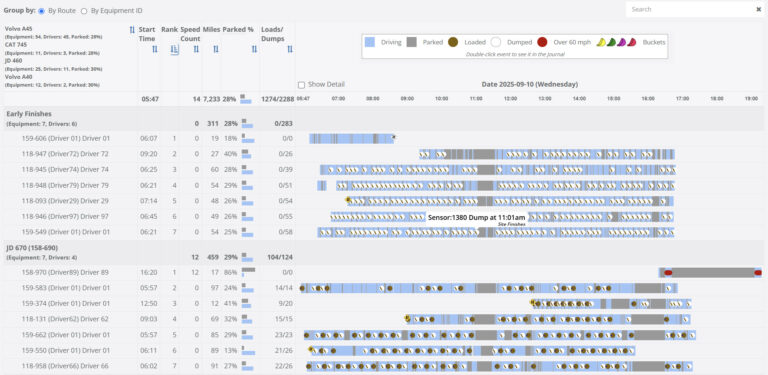
Detailed Snapshot of RPS Tracker Driver Reports
Most Frequently Used Performance Data on RPS Tracker
  • Grouped by assigned task, meaning equipment-to-equipment comparisons are ‘apples-to-apples’ for all equipment performing the exact same task.
  • Results are sorted by the poorest performers at the top, so you know where to focus your attention for rapid improvement.
  • When machines and operators are underproducing, you have the data to drill into the causes:
    • Parked too long.
    • Comparative underperformance: Load/Dump speed does not match other operators’ performance on the same task.
    • BunchUps around an excavator.
Catch Inefficiencies and Waste Early. Fix Them Before They Cost You Time and Margin.

Monitor Excessive Parked & Wait Times

  • In this example, the average truck wait time for this excavator is 32% higher than the other excavators.
  • Determine whether delays are caused by the excavator, trucks, or operators.
  • Compare wait times:
    • Truck/driver to truck/driver
    • Excavator to excavator
    • Excavator/truck team to excavator/truck team
    • Overall fleet lost time

*Note: Excavator ‘movement’ includes both rotation and lat/long travel.

Track Excessive Wait Time by Machine and Driver/Operator - Then Act on It.
RPS Tracker Snapshot Report of Wait Times

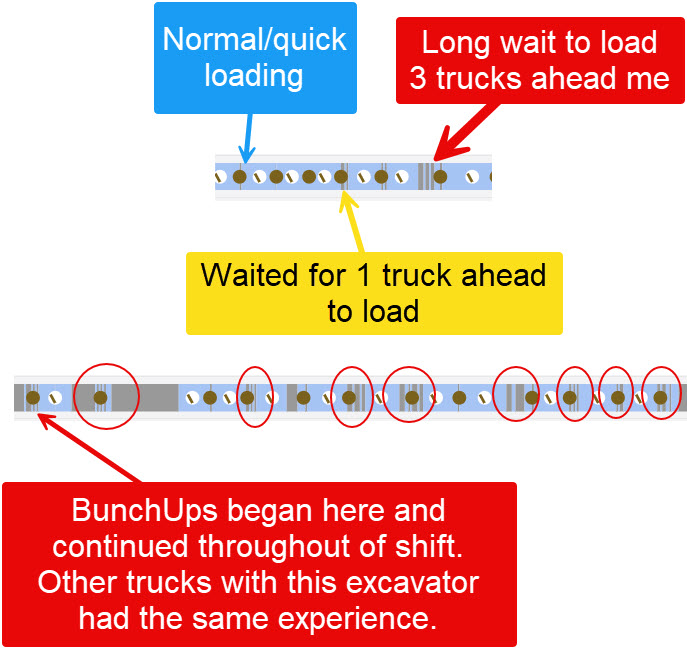
Stop Machine BunchUps™ Before They Stall Production

RPS Tracker BunchUps log
  • See when trucks have been waiting in line behind others and waiting to be loaded.
    • Know when you have too many trucks per excavator and when to reassign machines to stay productive.
    • Check machine task assignments and rebalance to other tasks as needed.
  • Take action:
    • Too many trucks per excavator? Check the task assignments.
    • See if the Equipment BunchUps™ are repeating and needing action, or due to a temporary event
    • Critical: Inspect the trucks waiting queue depth – 2 or more trucks consistenly in waiting status requires action!
Flag & Prevent BunchUps Before They Drain Time, Delay Loads, and Disrupt Cycle Efficiency.

Know Exactly Where Every Machine Has Traveled and What It’s Done

  • Audit the entire daily path and time spent in each geofence, load/dump counts, and distance travelled
  • View path(s) on the map in real-time or animate and control playback speed.
  • Read logbook cards with detailing each key event, such as Load, Dump, and Geofence Entry/Exit times.
Use Equipment Journal to Audit Every Haul Path & Material Placement, From First Load to Last Dump.
Visual representation of ADT activity in its journal log on RPS Tracker.

Audit Critical Events

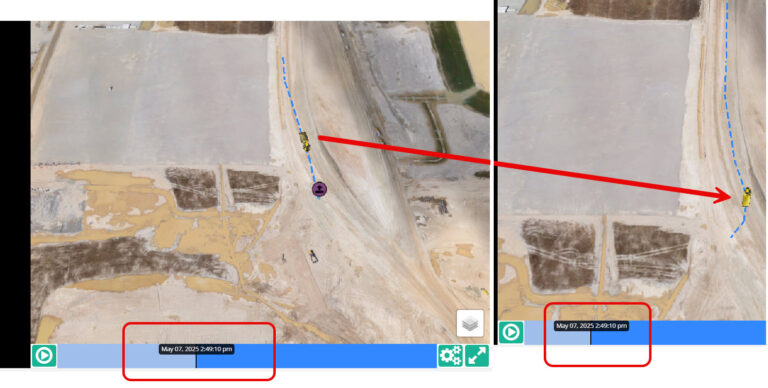
RPS Tracker's journal report logging an accident event.

When something goes wrong or doesn’t add up, RPS Tracker gives you the full story.

In this real example, the driver from Truck 1 claimed, “A truck pulled out in front of me.”

With precise timing, RPS Tracker pinpointed and identified the exact moment and truck that crossed its path.

Audit ‘Critical Events’ and provide data-backed evidence for internal investigations, insurance claims, and legal proceedings.

There is more to site operations than counting loads and dumps.

It’s Your Data. Own It and Shape It Your Way.

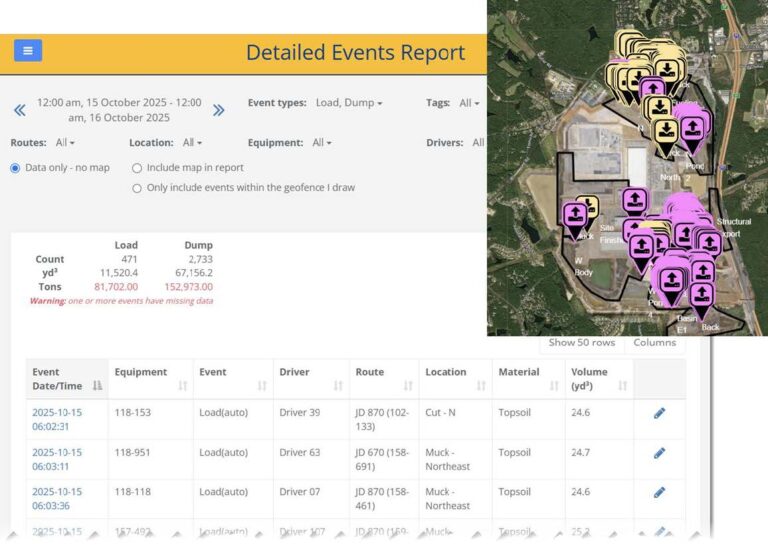
  • Extensive report filter options to get exactly what you need, including using the map to draw a dynamic polygon area of interest.
  • List (and map) events such as Load, Dump, Enter/Exit Locations.
  • You’re in control:
    • Select columns of interest.
    • Sort by column.
    • Instantly search/filter within report results without re-running the report.
    • Add a polygon to filter your data further.
  • Export your report data to CSV, Excel, PDF, Print, or the Clipboard for further analysis in your favorite tools.
You Control How Your Data is Filtered, Viewed, and Shared.
Visual representation & data chart of loads and dumps reports logged on RPS Tracker

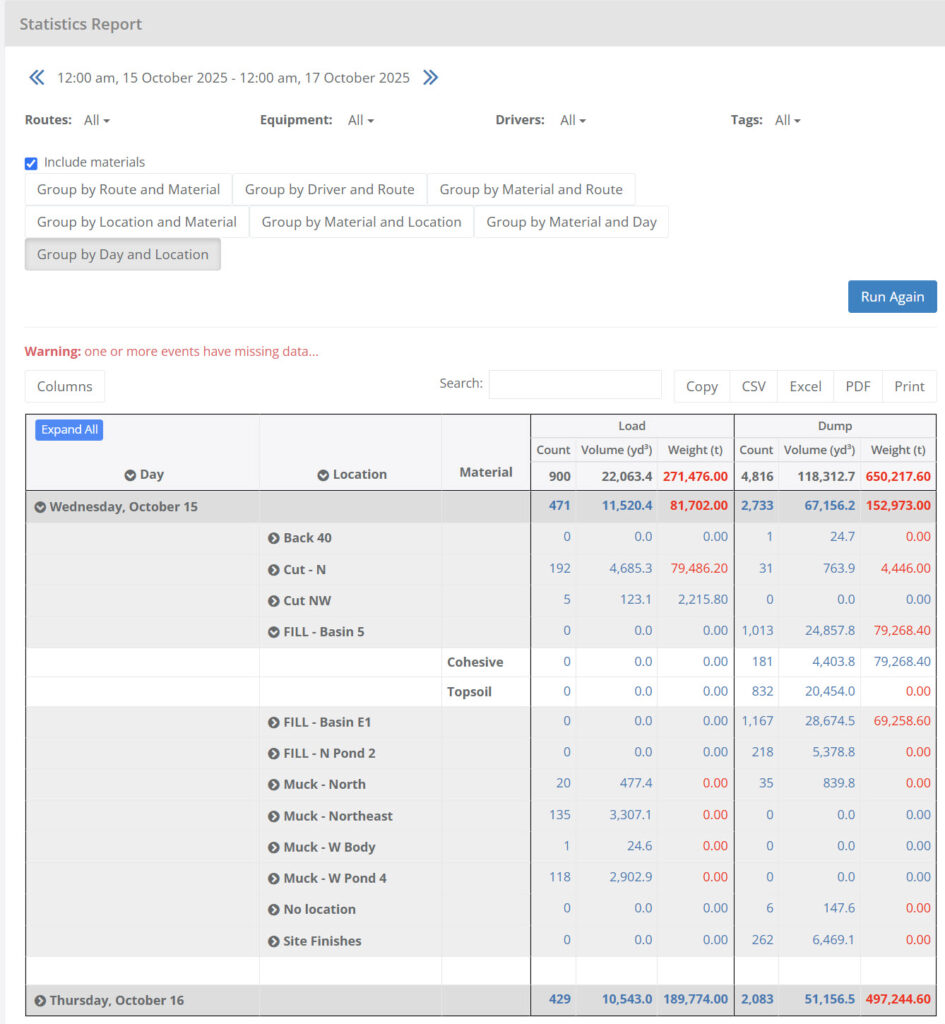
Detail When You Need It. Summaries When You Don’t.

Materials & Locations statistics report from RPS Tracker

Details matter, but the real story comes from summaries you can trust and insights you can act on to stay profitable.

Easily organize your data to compare results, find patterns, compare performance, and uncover inefficiency and waste trends fast.

RPS Tracker allows you to easily group and sub-group your load and dump counts/volumes by day, location, material type(s), and more to benefit your project stakeholders, along with any other specific reporting needs.

Export summaries to CSV, Excel, PDF, Print, or the Clipboard for further analysis in your favorite tools.

Turn Complex Data Into Clear Recommendations.

Manage Machines & Drivers/Operators with Task Assignments

How do you manage your fleet without knowing exactly each machine’s assignment?

RPS Tracker makes it easy to:

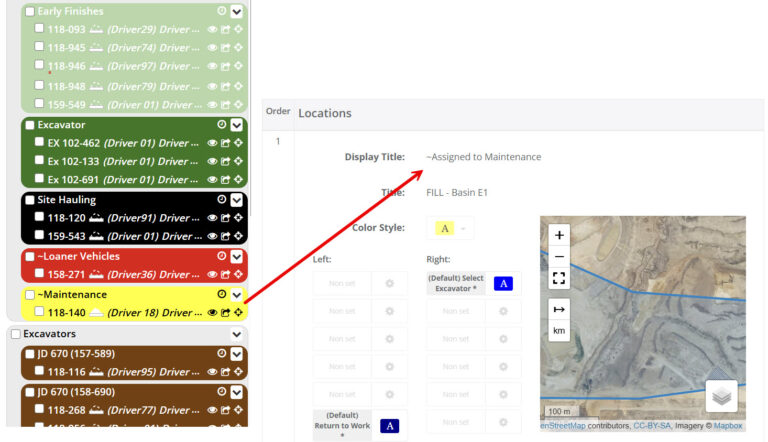
  • Define your own Task names and highlight colors to organize and track each asset by assignment.
  • Assign driver buttons based on task and location. For example, prompt drivers to use the Smart Data Collector (SDC) to take a picture of a quarry load ticket when they’re at the outbound truck scale so it’s included with the Load Event record.
  • Add an Operator Stats button(s) so they can check their daily/weekly performance while waiting to be loaded.
  • Automate location-based actions, such as turning the screen red and displaying “In restricted zone. Leave this Area!” when entering a restricted geofence.

All worksite activity is associated with the task; enabling RPS Tracker to report statistics by Task Assignment automatically.

Assigned to Maintenance Snipped from RPS Tracker
Create and Assign Tasks. Track Performance. Take Action in Real-Time.

Automated Email & SMS Summary Reports After Each Shift

Daily Site Volumes - RPS Tracker
Stop Wasting Time Scrambling to Gather & Then Manually Re-Enter Data. Let RPS Tracker Do It!
  • Automatically send daily haul summaries and eliminate the current scramble to gather and send daily activity.
  • Define your own summaries, set preferred Email & SMS delivery times, and share updates effortlessly with project stakeholders.
  • Set load/dump targets by Location or Task, automate your daily reports, keep stakeholders informed, and stay on track with zero effort. Save time and focus on what matters most:
    • Work weekends or half-shifts? No problem, targets are per workday.
    • Everyone can track actual vs. target performance and productivity.
  • Subtotal results by Location, Material Type, Task/Route, or Equipment Category.

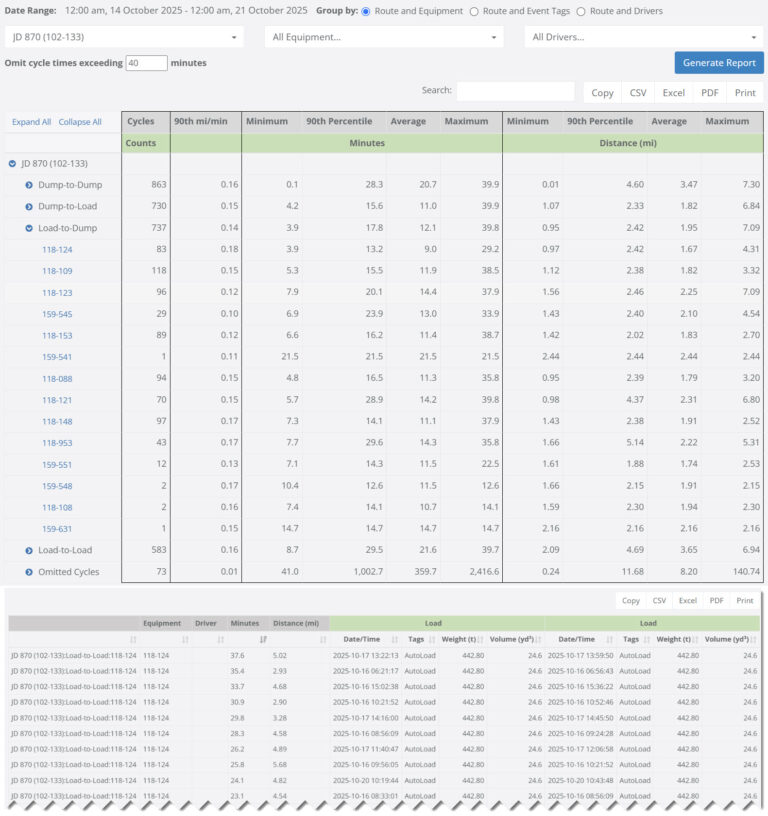
Cycle Times & Performance Insights

  • Specify your “max cycle time” so non-production related events, such as lunch breaks, do not skew your times and distances.
  • All reports include “Omitted Cycles”which show why events were excluded for full transparency (e.g., Maximum cycle time exceeded, Load without a Dump).
  • Audit and review all cycles included in the report to ensure data accuracy, identify any outliers that may wrongly skew your averages, and build confidence in your results.
  • Knowing that the return haul path may not be the same, Tracker uses precisely positioned Load and Dump Events to produce Load-to-Dump, Dump-to-Load, Load-to-Load, and Dump-to-Dump reports.
  • Understand Travel Times and Travel Distances with 90th percentile, Average, Minimum, and Maximum.
  • Export summaries to the clipboard, CSV, Excel, PDF, or Print for further analysis using your favorite tools.
RPS Tracker Takes Cycle Times to the Next Level.
Cycle Times sheet example from RPS Tracker

BUILT TO CAPTURE EVERY DETAIL, EVERY SHIFT

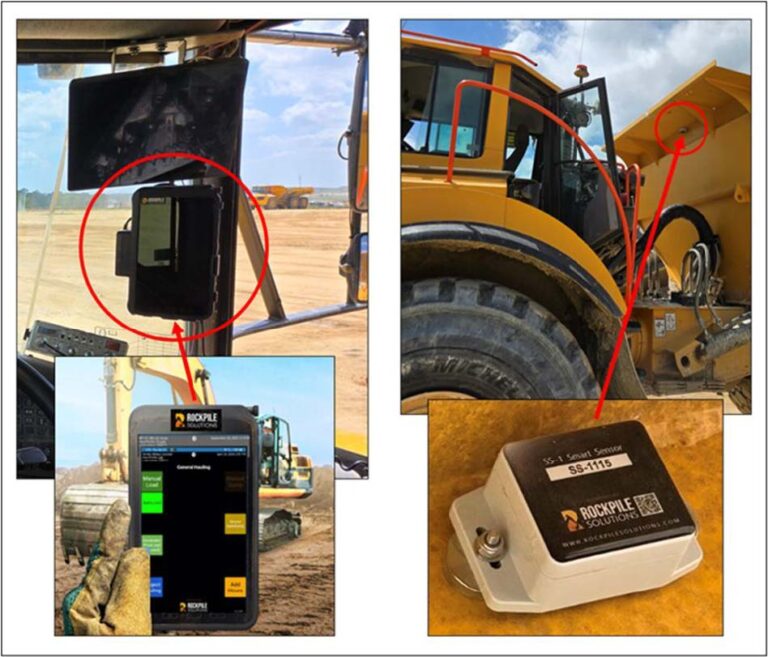
RPS Tracker’s in-cab Smart Data Collectors (SDCs) are rugged, OEM-agnostic, and start capturing data the moment your machine powers on.

Compatible with any fleet. Whether owned, leased, or subcontracted….and across all makes, models, and years.

Installs in 10–15 minutes and stays firmly in place with a tab-tite composite holder and RAM® Twist-Lock™ dual suction cup mount for maximum stability.

RPS Tracker SDC & Sensors Deployed

Automatic software updates keep your system current with zero downtime.

RPS Tracker’s wireless material placement sensor features a robust, heavy-duty magnetic mount, allowing for quick and hassle-free installation and removal in just 2 minutes. No tools or complex setup required.

RPS Tracker Sees What OEMs Can’t. Increasing Productivity and Profitability.

Improve your Earthmoving Efficiency

RPS Tracker - Earthmoving Intelligence™
Simple Hardware. Smarter Insights. Immediate Impact.

Contact

Have questions, comments, inquiries, feedback about the site (including any oversight or mistake)? Please let us know by filling in the information below and clicking submit! You can also use this as a first step in contacting us to use our services to write a custom TML or program for you or your company.

Name
This field is for validation purposes and should be left unchanged.